
 النسخة العربيه
Website Speed Optimization and Its Impact on Your Google Rankings


In modern SEO, website speed is no longer a secondary technical factor. It has become a decisive element in user experience (UX), conversion rates, and your website’s ranking on Google search results.
With Google’s recent updates—especially those related to Core Web Vitals—any slow website is now at serious risk of losing traffic and customers, even if its content is excellent.
In this comprehensive guide by CircleAims, we will walk you step by step through:
-
Why website speed directly affects Google rankings
-
How to measure your website speed correctly
-
The relationship between technical performance and business results
-
The latest performance standards adopted by Google
First: What Does Website Speed Really Mean?
Website speed does not simply mean “how fast a page opens.”
It includes a set of technical indicators that measure the real loading experience for users, such as:
-
First Contentful Paint (FCP)
-
First Input Delay (FID) / Interaction to Next Paint (INP)
-
Cumulative Layout Shift (CLS)
-
Fully Loaded Time
Google evaluates speed from the user’s perspective, not just raw technical numbers.
Second: Why Is Website Speed a Core Ranking Factor in Google?
1️⃣ Website Speed = Better User Experience
According to Google reports:
-
53% of users abandon a page if it takes more than 3 seconds to load
-
Every additional second of delay can reduce conversions by up to 20%
Google’s goal is to deliver results that satisfy users:
Faster website = Happier user = Higher ranking
2️⃣ Google Has Officially Confirmed Speed as a Ranking Factor
Since the Page Experience Update:
-
Page speed became a formal part of Google’s ranking algorithm
-
Websites that perform well in Core Web Vitals gain a competitive advantage
📊 Important statistic:
Websites ranking on the first page of Google are, on average, 40% faster than those on the second page.
3️⃣ Speed Directly Affects Crawling and Indexing
Slow websites:
-
Consume crawl budget faster
-
Get fewer pages indexed
-
Experience delays in indexing new content
This is especially dangerous for:
-
E-commerce websites
-
Large blogs
-
Digital service websites
Third: Core Web Vitals – The Backbone of Speed Evaluation

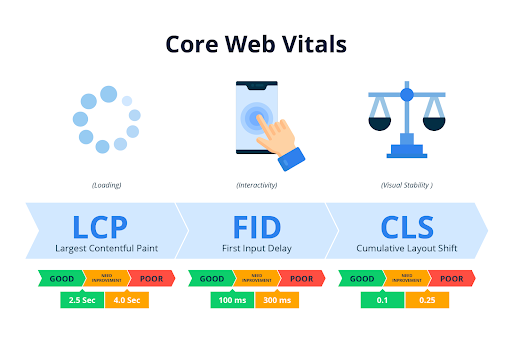
Google currently relies on three main metrics:
🔹 1. LCP – Largest Contentful Paint
Measures how long it takes to load the largest visible element.
Good threshold: Less than 2.5 seconds
🔹 2. INP – Interaction to Next Paint
Measures how quickly the site responds to user interaction.
Good threshold: Less than 200 ms
🔹 3. CLS – Cumulative Layout Shift
Measures visual stability during loading.
Good threshold: Less than 0.1
❗ Failing any of these metrics sends a negative signal to Google.
Fourth: Website Speed and Commercial Impact
Website speed optimization is not just for SEO—it directly impacts revenue.
📈 Proven statistics:
-
Amazon: Every 100ms delay = 1% loss in sales
-
Walmart: 1 second improvement = 2% increase in conversions
-
Google: 0.5 second slowdown reduced searches by 20%
💡 What this means for your business:
-
Lower traffic acquisition cost
-
Higher conversion rates
-
Reduced advertising costs
-
Stronger brand trust
Fifth: How to Measure Website Speed Correctly
A common mistake is relying on one tool only.
Google’s main tools:
-
Lighthouse
-
Chrome UX Report (real user data)
🔍 What really matters:
-
Lab Data vs Field Data
-
Mobile vs Desktop performance
-
Site-wide issues vs page-specific problems
At CircleAims, we always prioritize real user data, not theoretical test scores.
Sixth: The Most Common Causes of Slow Websites (Quick Overview)
We’ll detail these later, but the main causes include:
-
Weak hosting
-
Unoptimized images
-
Poorly optimized JavaScript and CSS
-
Excessive plugins (especially on WordPress)
-
No caching
-
No CDN
Why Is This Guide Important for You?
Because website speed optimization today:
-
Is no longer optional
-
Is a core requirement for visibility and competitiveness
Especially for commercial websites and online stores.
Website Speed Optimization and Its Impact on Google Rankings
First: The Real Causes of Slow Websites (Not the Obvious Ones)
1️⃣ Weak Hosting = Weak SEO (No Debate)
More than 60% of speed issues are caused by hosting.
📊 Reliable statistic:
Websites hosted on slow servers fail Core Web Vitals by over 45%.
Common mistakes:
-
Cheap shared hosting
-
Server far from target audience
-
Limited CPU / RAM resources
Professional solution:
-
Cloud hosting or VPS
-
Server close to your audience
-
HTTP/2 or HTTP/3 support
📌 Important: No WordPress plugin can fix bad hosting.
2️⃣ Unoptimized Images – The Silent Performance Killer
Images account for 50–70% of page size.
Common mistakes:
-
Large PNG or JPG files
-
Oversized image dimensions
-
No Lazy Loading
📉 Result:
-
High LCP
-
Poor UX
-
Lower rankings
Solution:
-
Compress images without quality loss
-
Use WebP or AVIF
-
Define image dimensions
-
Enable Lazy Load below the fold
📊 Image optimization alone can reduce load time by up to 40%.
3️⃣ Poorly Optimized JavaScript & CSS
Excessive JavaScript is one of the biggest performance threats.
Problems:
-
Large files
-
Non-async loading
-
Unused code
Direct impact:
-
Poor INP
-
Interaction delays
-
Bad mobile UX
Solution:
-
Minify CSS & JS
-
Delay non-critical JavaScript
-
Load Critical CSS first
4️⃣ Too Many Plugins (Especially in WordPress)
📊 Slow websites often use 25+ unnecessary plugins.
Common issues:
-
Duplicate functionality
-
Outdated plugins
-
Heavy page builders
Solution:
-
Remove unnecessary plugins
-
Replace heavy plugins with lighter alternatives
-
Use custom code where possible
5️⃣ No Caching
Caching = Faster loading + Less server load.
Key cache types:
-
Page Cache
-
Browser Cache
-
Object Cache
Without caching:
-
Every visit loads from scratch
-
Constant server strain
-
Persistent slowness
6️⃣ No CDN (Content Delivery Network)
CDNs distribute content across global servers.
📊 Benefits:
-
Faster loading worldwide
-
Reduced server load
-
Better LCP & TTFB
CDN usage can improve speed by 30–60%.
Second: Priority Order – What Actually Impacts Rankings?
🔥 Top priorities:
-
Hosting
-
Images
-
LCP
-
INP (especially mobile)
⚠️ Secondary optimizations:
-
Fonts
-
Animations
-
Heavy design elements
At CircleAims, we focus on ranking impact and ROI—not cosmetic scores.
Third: Website Speed & Mobile – The Real Battle
📊 Over 65% of Google traffic comes from mobile.
Google uses:
-
Mobile-First Indexing
-
Mobile speed as the primary evaluation
Common issues:
-
Non-responsive design
-
Large elements
-
Heavy JavaScript
📉 Poor mobile performance = Poor rankings (even if desktop is perfect).
Fourth: Speed and Google Ads
Slow pages don’t just hurt SEO:
-
Higher CPC
-
Lower Quality Score
-
Fewer conversions
📊 Google confirms that page speed directly affects ad quality.
Fifth: What Should You Do Now? (Smart Action Plan)
✔ Service websites:
Focus on homepage and landing pages
✔ E-commerce stores:
Product pages, category pages, checkout
✔ Blogs:
Top-traffic articles and organic landing pages
Frequently Asked Questions (FAQ)
1️⃣ What is website speed?
Website speed is the time it takes for content to load and respond to users, measured through metrics like LCP, INP, and CLS.
2️⃣ Does website speed really affect Google rankings?
Yes. Website speed is an official ranking factor, especially after the Page Experience and Core Web Vitals updates.
3️⃣ What are Core Web Vitals?
They are user-experience metrics (LCP, INP, CLS) that Google uses to evaluate real performance.
4️⃣ What is the ideal load time according to Google?
Google recommends LCP under 2.5 seconds.
5️⃣ Does improving speed increase sales?
Yes. Faster websites can increase conversion rates by up to 20%.
6️⃣ Is a PageSpeed score of 100 necessary?
No. Google focuses on real user data, not perfect scores.
7️⃣ What is the difference between Lab Data and Field Data?
Lab Data is simulated testing; Field Data is real user behavior—which Google relies on.
8️⃣ Is optimizing only the homepage enough?
No. Google ranks individual pages, not just the homepage.
9️⃣ What is the most common cause of slow websites?
Weak hosting, uncompressed images, excessive JavaScript, and too many plugins.
🔟 Does hosting affect speed?
Absolutely. Hosting is the foundation of performance.







No comment